Service health at a glance, receipts that read themselves, a real multi-bike garage, GPS ride tracking, route planning and ride videos, recall alerts, costs and fuel analytics, curated routes, crash detection, your lock screen, your wrist, and a spec book for 42,000+ models across every make, back to 1894. All of it living in your own iCloud — never on our servers.
New in RIDR 4.0
The biggest update yet.
Plan a Route Pro
Stop by stop, drag to reorder, avoid highways or tolls, and Twisty finds the curvier roads. Ride it in RIDR or send it to Apple Maps or Google Maps. More
Ride videos Pro
Any ride as a 15 or 30 second video, the route drawing on and your numbers riding along, saved to Photos.
Recall alerts Pro
A monthly check of NHTSA’s recall database for your bikes. Mark one completed and it goes into the service history.
Miles or months Pro
Intervals by miles or months, whichever comes first; tires, pads, battery, coolant and inspection; your own named intervals and spec lines. More
Costs Pro
Per bike and for the whole garage: maintenance, fuel, cost per mile, year by year, in your currency. More
Backup & transfer Pro
The whole garage as one file, spreadsheets of service, fuel and rides, and a bike’s history sent to its next owner.
Glovebox documents Pro
Registration, warranties and more beside the insurance card, each with a reminder before it expires. More
Your color Pro
Pick the accent color that runs through the app and the watch.
Five languages
English, Spanish, French, German and Italian.
Service Health
One ring tells the truth.
The weakest interval on the bike drives the number.
The Maintenance card rolls every service interval into a single health ring — and it's honest by design: the ring shows your worst item, not an average. Under it, a dot for each service with the exact miles remaining.
Per-item countdowns. Oil, primary, transmission, plugs, air — each with miles left, right on the dashboard. Brakes join the ring when tracked by mileage.
Green, amber, red. More than half the interval left, under half, under a quarter. The ring and the dots share the same bands.
Overdue doesn't hide. A blown interval shows the miles you've gone past — and pulses until you log the work.
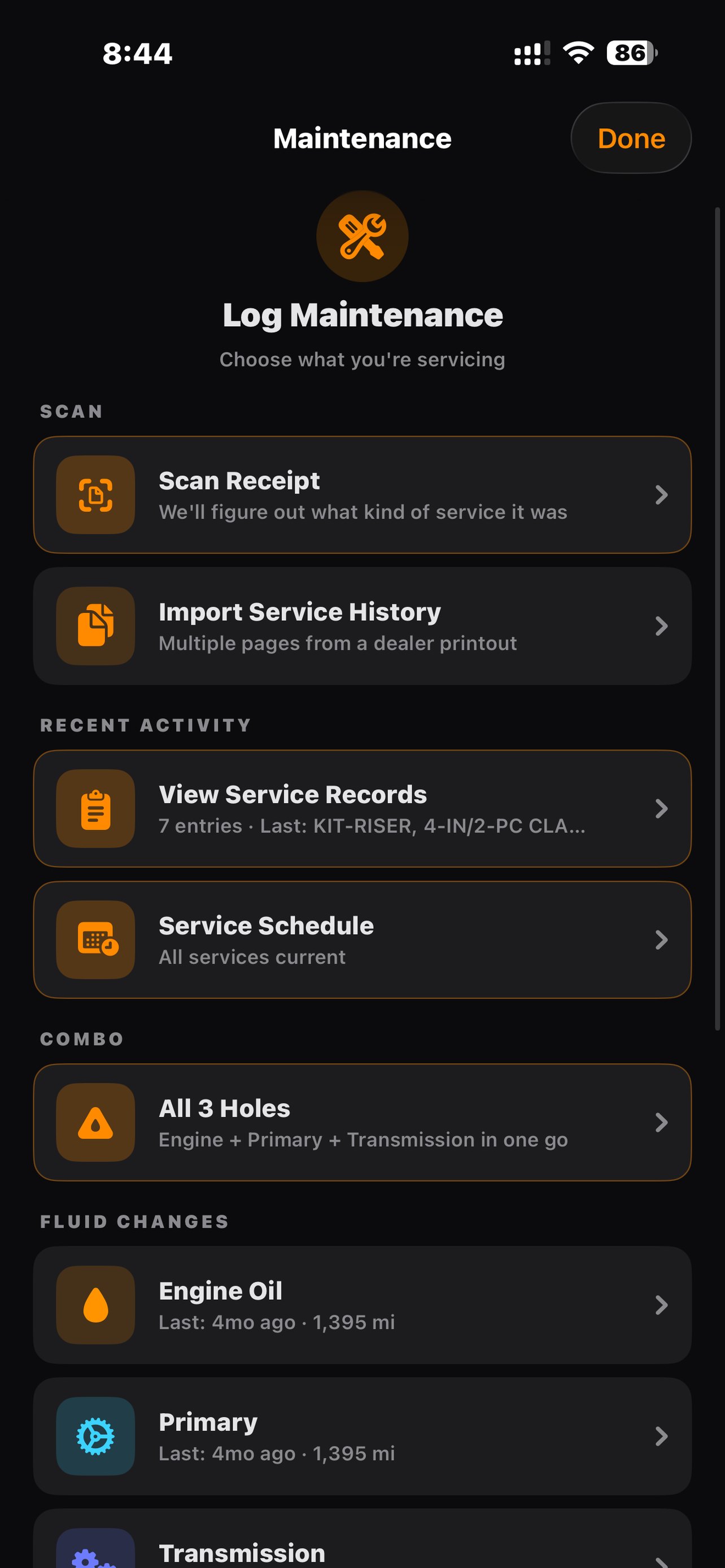
Log Maintenance
Log it the way you wrench it.
One hub. Every kind of work.
The Maintenance hub is organized like your garage: fluids, wear items, combos, and the custom stuff. Every entry stamps the date and mileage so "when did I last do the primary?" is never a mystery again.
All 3 Holes. Engine, primary, and transmission logged as one service, one tap. Harley owners only — the app knows your bike.
"Last:" stamps everywhere. Each fluid shows when and at what mileage it was last changed.
Custom services and upgrades. Risers, exhaust, seats — if you bolted it on, it belongs in the record.
Receipt Scanning
Receipts that read themselves.
Other apps make you type. RIDR reads the receipt.
Point your camera at a dealer receipt — Harley-Davidson service desk, parts counter, independent shop. RIDR captures the photo and pulls the date, vendor, location, total, and every line item into the record.
Every line item. A receipt with 20 parts comes in as 20 rows. No cap.
Everything's editable. OCR does the typing; you fix the odd character in a tap.
Cost-mismatch nudge. If line items don't add up to the total (tax, labor, fees), RIDR flags it — without overriding your numbers.
Scan again. Bad first pass? Redo and replace.
Service History Import
Bring the dealer's history with you.
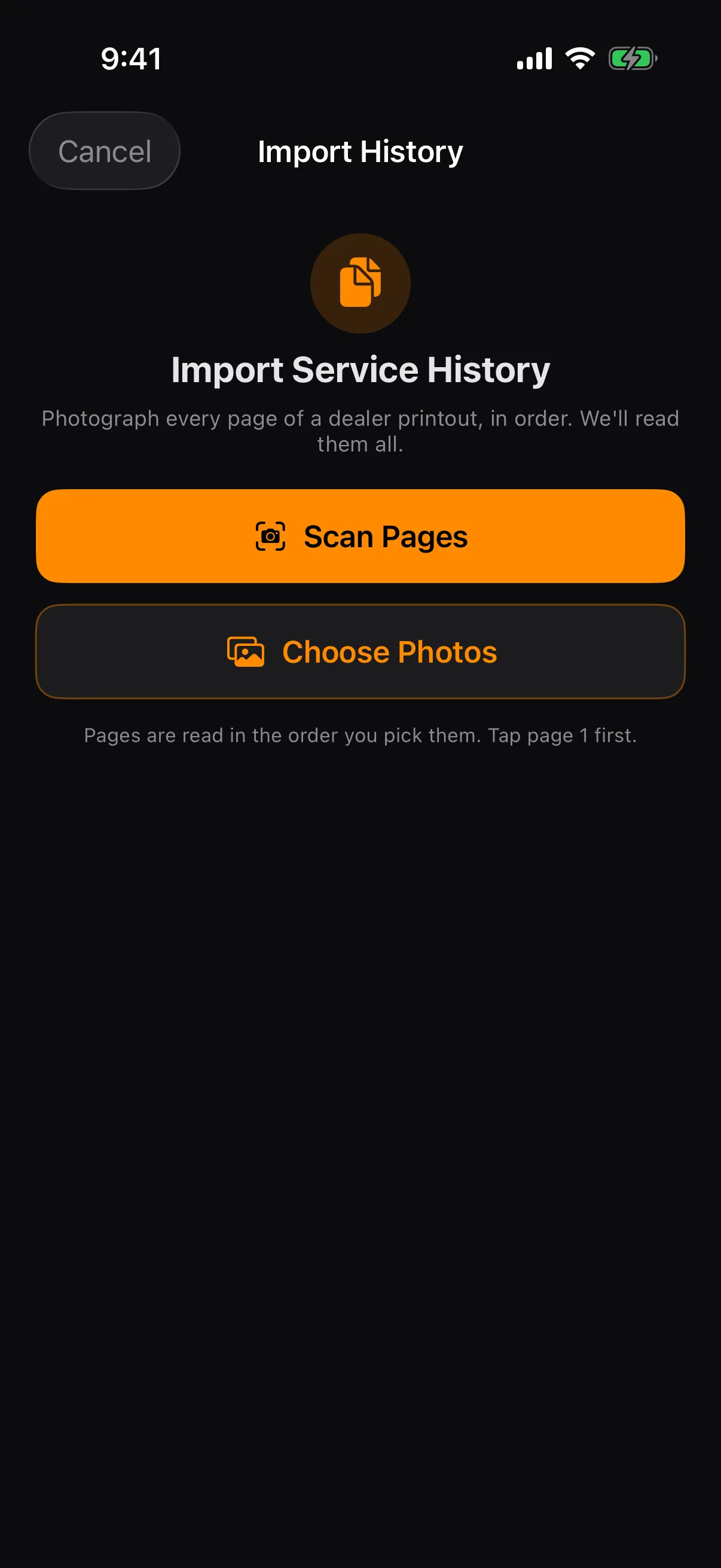
Photograph the printout. RIDR reads the visits off it. Pro
A dealer's service history is a stack of pages with no prices on it and one visit running straight into the next. RIDR finds where each visit starts, reads the date, the mileage, the dealer and the work-order number, and writes one record per visit — keeping the pages themselves as the evidence you show a buyer.
Six pages at a time. Shoot them in order; you confirm the page order before anything is written.
Nothing is guessed. A field it can't read is left blank for you to fill, never invented.
It won't import the same visit twice. Visits are keyed on the dealer's work-order number, so a re-import adds only what's new.
It checks it's the right bike. If the VIN on the printout isn't the bike you started from, it stops and tells you.
The pages stay. Stored once per import and cross-referenced from every record it created.
Multi-Bike Garage
One bike or seven.
Each with its own everything.
Switch bikes from the Garage tab with one tap. Each machine keeps its own service history, mileage, rides, fuel log, photos, and specs. Harleys, a Triumph, your kid's CBR — the garage doesn't care what's in it.
VIN scan setup. Point the camera at the VIN sticker and RIDR decodes year, make, and model through the NHTSA database. Type-in works too — and vintage bikes get a frame-number mode.
No duplicates. RIDR checks the VIN on add so the same bike never sneaks in twice.
Nicknames and photos. "Gray Ghost," "Betty White" — name them, shoot them, make the garage yours.
Glovebox
The paperwork you can't leave at home.
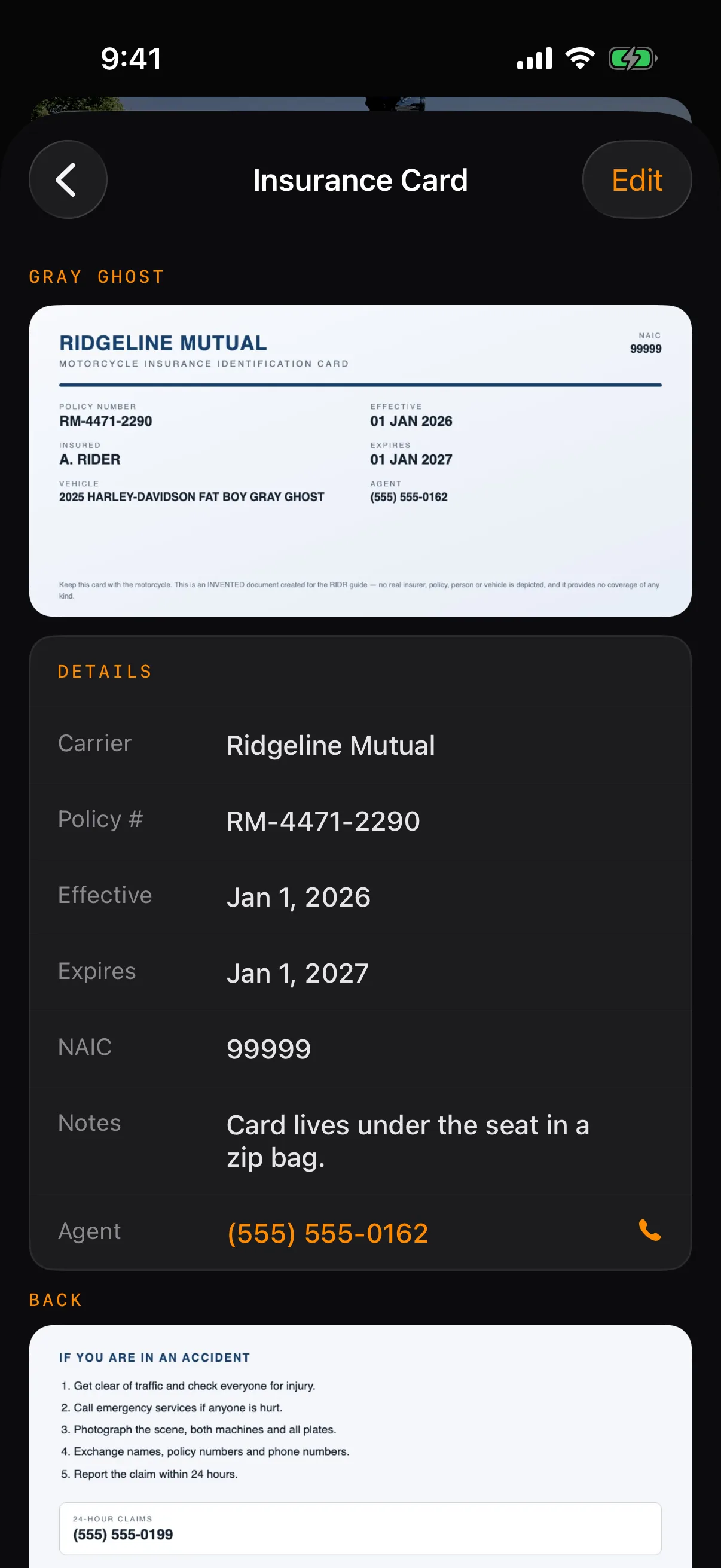
Your insurance card and registration, on the bike, with no signal.
Stopped at the roadside you need the card now, not after a page loads. Photograph the front and the back and RIDR reads what it can — carrier, policy number, the dates — and files it against the right bike. The picture is on the phone, so it works in a dead spot.
Scan it once. Point the camera at the card and the fields fill themselves in.
Front and back. Both sides kept together — the claims line is on the back.
One policy, several bikes. Pick every bike the card covers and RIDR files a copy against each.
It tells you before it lapses. A card near its date changes color on the list.
Registration, warranties and more. New in 4.0: any document gets its own place beside the card, with a reminder before it expires. Pro
Ride Tracking
Every mile, against the right bike.
GPS rides feed straight into the odometer.
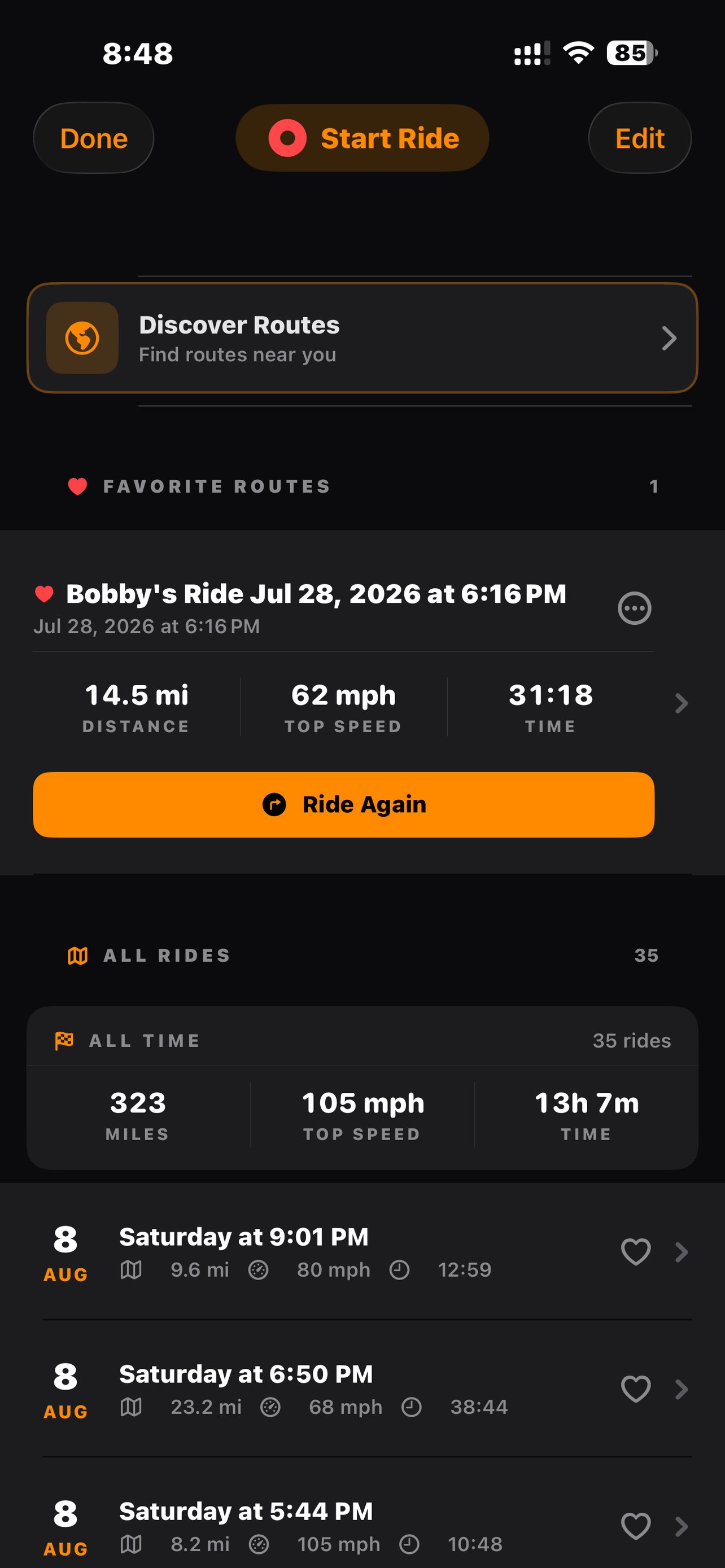
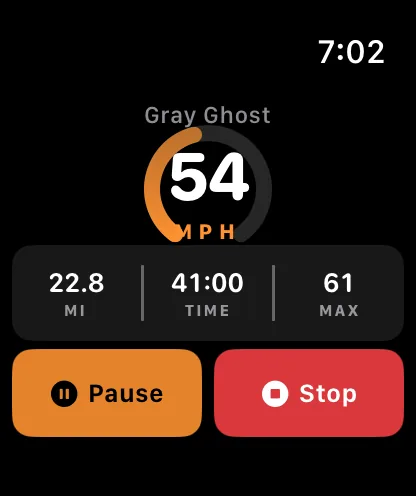
Start a ride from the app or your watch. RIDR records the route, distance, speed, elevation, and time — and credits the miles to the bike you rode, so service intervals stay honest without you touching a number.
All-time stats. Total miles, top speed, saddle time — the numbers that matter, up top.
Favorites and full history. Name your routes, star the good ones, replay any ride on the map.
Share a live link. Tap Share on the ride banner and send a live.ridr.net link that tracks you in real time — and expires when the ride ends. Pro
Insta360 and Apple Health. One tap writes the ride to Apple Health as a cycling workout with its route — which is exactly what Insta360 reads to burn speed and distance onto your footage. Pro drops a GPX alongside it.
Discover
Find roads worth riding. Or plan your own.
Wolfpen Gap. The Dragon. Richard Russell.
Discover lives right in your Rides list and surfaces the routes riders actually want — tagged by character so you can filter for exactly the kind of day you're after.
Near Me and By State. Ride today, or plan the trip. By State and the whole route book are Pro. Pro
Tagged for character. Twisty, mountain, technical, scenic, loop.
One-tap start. The route loads, tracking begins, miles credit to your bike.
Plan a Route. New in 4.0: add stops, drag to reorder, avoid highways or tolls, and let Twisty find the curviest way there. Ride it in RIDR with your line on the map, or send it to Apple Maps or Google Maps. GPX in and out. Pro
Ride videos. Turn any ride into a 15 or 30 second video, saved straight to Photos. Pro
Service Schedules
What's due, and when.
Pre-loaded for ten makes. Overridable for yours.
Oil at 5,000 or annually. Primary at 10,000. Plugs at 20,000. RIDR ships with factory-style intervals for Harley-Davidson, Indian, Honda, Yamaha, Kawasaki, Suzuki, BMW, Ducati, Triumph, and KTM — and lets you override any of them per bike.
Pre-loaded intervals. 222 spec profiles across ten makes, out of the box.
Your bike, your rules. Custom intervals override anything.
Miles or months, whichever comes first. New in 4.0: brake fluid, tires, pads, battery, coolant and inspection can be scheduled too, you can name your own intervals and add your own spec lines, and reminders arrive even when you haven't ridden. Pro
Recall alerts. RIDR checks NHTSA's recall database for your bikes every month. Mark a recall completed and it moves into your service history. Pro
Overdue doesn't whisper. Miss one and it goes red, shows how far past you are, and pulses until the work is logged.
Fuel
Know what she drinks.
MPG, cost per mile, and where the money goes.
The Fuel tab keeps a lifetime ledger per bike: average MPG, total spent, every fillup. Log at the pump in seconds — odometer, gallons, price — and RIDR does the math.
Real MPG. Full-tank flag keeps the math honest; a "skipped a fillup" toggle keeps one forgotten stop from wrecking the average.
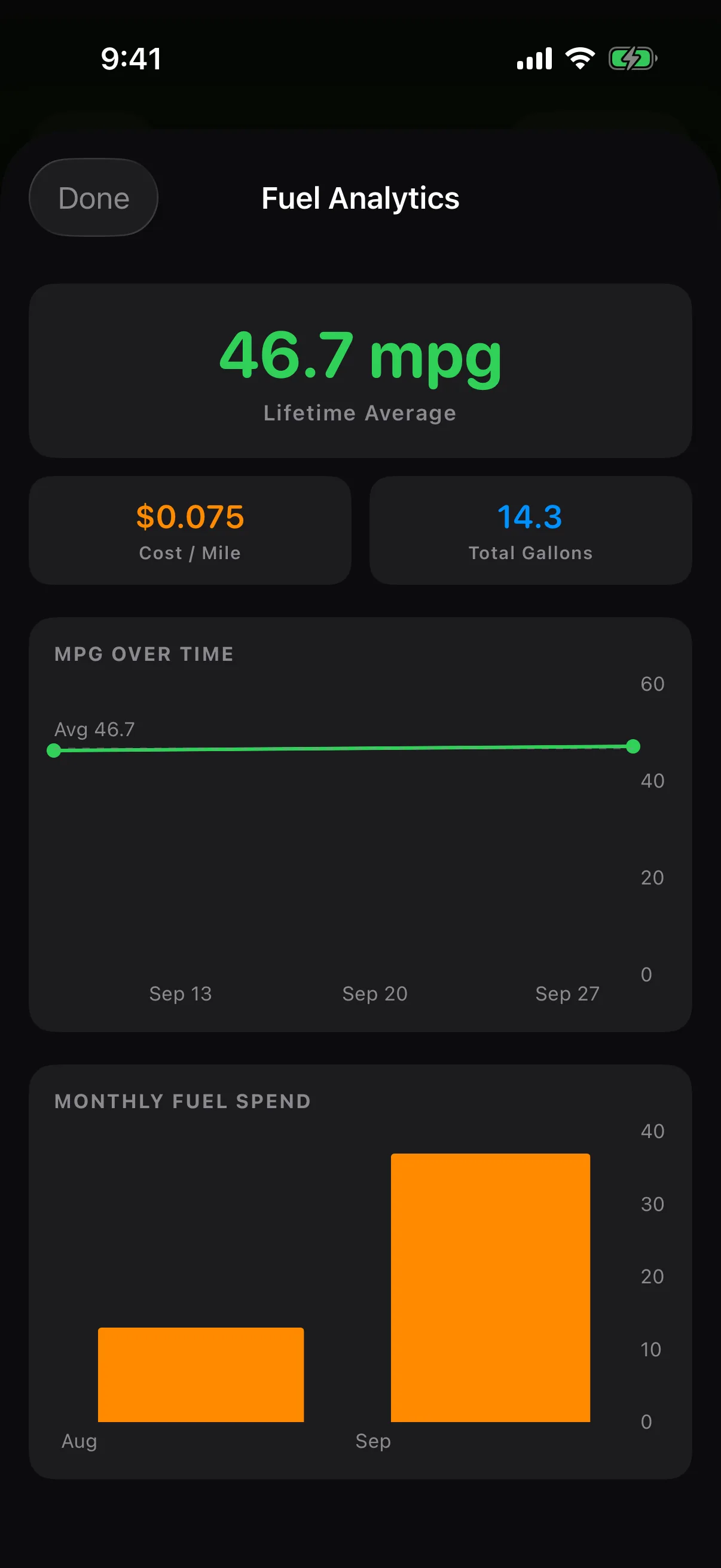
Fuel analytics. Lifetime average, cost per mile, gallons, MPG over time, and a monthly spend chart. Pro
Log from the watch. Quick entry at the pump with the Digital Crown — phone stays in your pocket. Pro
Costs. New in 4.0: maintenance and fuel together, per bike and for the whole garage, cost per mile and year by year, in your currency. Pro
Metric-ready. Flip the units and it's liters and L/100km everywhere.
Safety SMS
Someone knows where you are.
Built for the riders who ride alone. Pro
Set your emergency contacts once. When you start a ride, RIDR can pre-compose a text with your start location, pinned in Apple Maps. When you're done, a "made it back safe" message is ready to go.
Start and end, independently. Two toggles. Use one, both, or neither.
Location pinned. An Apple Maps link drops right in the message.
Your words. Both message templates are editable and remembered.
As many contacts as you need. Spouse, riding buddy, family — everyone gets the text.
Crash Detection
If you go down, someone knows.
A hard impact starts a countdown you control.
During a ride, RIDR watches the motion data for the signature of a crash. A hard impact brings up a full-screen 30-second countdown with one job: give you the chance to say "I'm OK." Hold to cancel and it's over. Don't — and your contacts get your exact location.
Automatic detection. Real sensor data, no button to remember.
30 seconds, hold to cancel. False alarms die in one sustained press — or tap "I'm OK" on the notification or your Apple Watch.
Two ways to send. Out of the box, Messages opens pre-filled — you tap Send. Flip on automatic alerts and RIDR's own relay sends the SMS itself, no tap needed — and retries if the first try can't get through.
Coordinates attached. Your location rides along so help knows where to go. Same contacts as Safety SMS — set them once, covered both ways.
Live Activity
Your ride lives on the lock screen.
Glanceable without opening the app.
Start a ride from your phone and RIDR pins a Live Activity to the lock screen and the Dynamic Island — your bike's photo, live speed, distance, and elapsed time, the whole way.
Lock screen card. Bike photo, speed, distance, time — front and center.
Dynamic Island. Compact pill with speed and time; long-press for the full readout.
One-tap stop. End the ride without unlocking into the app.
Specs Database
Your bike's manual, on your phone.
42,000+ models back to 1894. Every make — deepest on Harley.
Oil capacity. Filter part numbers. Fluid types. Compression, torque, tire sizes. RIDR ships with the numbers so you're not digging through a service manual with greasy hands.
OEM and aftermarket filters. Factory part numbers with K&N cross-references.
Fluids to the ounce. Engine, primary, transmission — exact capacities, exact types.
Every make. Harley-Davidson, Indian, Honda, Yamaha, Kawasaki, Suzuki, BMW, Ducati, Triumph, KTM, and everything in between — 42,000+ models back to 1894.
NHTSA VIN decoder. Scan or type it — year, make, and model fill themselves in.
Apple Watch
Your bike on your wrist.
The watch knows what the phone knows.
Pin the RIDR complication to your watch face and ride status is a glance away — the motorcycle icon lights up with a REC badge while you're rolling. Doing the work from your wrist is Pro.
Service status at a glance. What's due on the bike you're sat on, without taking the phone out.
Recent rides. The last few rides, with distance and time.
Start and stop from the wrist. Phone stays in your pocket. Pro
Quick Oil. Log an oil change in seconds, right from the watch. Pro
Fuel at the pump. Dial in gallons with the Crown — metric-aware. Pro
Out of range? It waits. An action taken with the phone in a saddlebag is queued, not lost — it lands the moment the two find each other again. Pro
Live ride stats. Distance, speed, duration, current bike — streaming as you ride. Pro
Also in the box
The small stuff that isn't.
Metric units
One toggle and it's kilometers, liters, and L/100km everywhere — phone and watch.
PDF export Pro
A clean service-history report with your receipts as a full-page appendix, cross-referenced by page.
GPX export Pro
Any ride, out as a GPX file — to a mapping app, a GPS unit, or your own records.
Odometer true-up
Reality drifted from the log? Tap the mileage, enter what the clocks say, done.
Ride-start heads-up
Anything overdue gets called out the moment you start a ride.
Data recovery
Orphaned records from a deleted bike aren't lost — find and reattach them in Tools.
Backup & transfer Pro
Back up and restore the whole garage as one file, export spreadsheets, and hand a bike's full history to its next owner's RIDR.
Nicknames & photos
Your bike, your name for it, your photo on its card and Live Activity.
Your data
On iPhone, we don't have servers. We can't see your data.
RIDR stores everything in your private iCloud — your service history, your receipts, your rides, your bikes — and syncs across your devices through Apple's CloudKit. There's no RIDR account because there's nothing to make an account on.
iCloud sync. iPhone, iPad, and Apple Watch stay current.
No analytics. No third-party SDKs, no tracking pixels.
No ads. Ever.
No accounts. No signup, no password. The app just works.
RIDR for Android (beta) works the same way, with Google in Apple's place. Google sign-in, your garage on the phone with a private copy in your own Google Drive. No RIDR account, no analytics, no crash reporting, no ads. Exactly what goes where.
RIDR for Android
In testing now. Coming soon to Google Play.
RIDR for Android is in testing on Google Play — invite only for now; email support@ridr.net to join.
The beta has the garage — add a bike by VIN, by camera or by hand, against the same 42,000-model spec book — the service log, All 3 Holes, the schedule by miles or months and the health ring, receipt scanning and dealer-history import, the fuel log and Costs, recall alerts, ride recording with GPX export, ride videos, Discover Routes, live ride sharing, ride start and end texts, crash detection with crash texts, the Glovebox with expiry reminders, backup, restore and bike transfer, and English, Spanish, French, German and Italian.
Not in the beta yet: the watch, Apple Health, the lock-screen Live Activity (Android gets an ongoing ride notification instead), road-following and Twisty in Plan a Route (Google Maps finds the roads when you navigate), receipts in the service-history PDF, and color themes. Pictures, and how to join.
One-man shop
Every feature on this page exists because a rider needed it.
RIDR is one person building for every rider. The dealer-history importer shipped because one beta tester asked. If the feature you need isn't on this page, or something here doesn't work right on your bike — tell me. Your feedback is the roadmap.
On the App Store
Get RIDR
Seven days free, then it's yours to keep or cancel. RIDR opens on the subscription screen with the monthly plan already picked — seven days free, then $9.99/month. Or take the year: $59.99, first year $39.99.
Cancel and RIDR keeps your bike, your records and crash alerts. Crash alerts keep working. They're never part of what you pay for.
RIDR Pro is the whole garage: every bike you own, receipt scanning, dealer service-history import, the service-history PDF, GPX export, fuel analytics, live ride sharing, ride start and stop texts, the whole route book with browsing by state, starting rides, logging fuel and logging service from your watch, and everything new in 4.0 — Plan a Route, ride videos, recall alerts, service by miles or months, Costs, backup and bike transfer, Glovebox documents with reminders, and your own color. What's in each tier, screen by screen.
Those are the iPhone prices. The Android beta doesn't charge anything while it's in testing.